
Tools for More Reviews
Welcome to our online store!
Here you will find the ideal solution to easily and regularly receive more reviews for your company.


NFC Evaluation Tool
Haptic NFC evaluation tool made of real pear wood with your individual company logo.
How it works

1. Take out your phone
Customer unlocks their NFC-enabled smartphone.

2. Tap with smartphone
The customer touches the device with their smartphone (NFC).

3. Submit rating
Customer is being redirected to the review page.
Choose the right path to more reviews
Find the ideal solution to easily and regularly get more reviews for your business.


NFC Evaluation Tool with Logo
- With your company logo
- NFC & QR code for your business
- Real pear wood
- Pre-programmed
- Manufactured in social workshops


NFC evaluation card
- With your company logo
- NFC & QR code for your business
- Recycled material
- Pre-programmed
- Produced in social workshops


NFC Assessment Tool Standard Version
- Google logo
- NFC & QR code programmable
- Genuine pear wood
- Proven design
- Manufactured in social workshops

NFC Rating Display Stand
- With your company logo
- NFC & QR code for your business
- Genuine ash wood
- Eye-catching design
- Manufactured in social workshops


50x Review Flyers
- With your company logo
- QR code for your business
- Recycled material
Ordering process

1. Order assessment tool
Choose your optimal tool and start your order.

2. Design Coordination
After you place your order, we will contact you personally if we still need a logo or the link to your Google review.

3. Ready to collect reviews!
Within 2-3 weeks at the latest, you will receive your evaluation tool and can get started.

Made in Austria

Personal support

Free shipping
Success Stories

11.5x our usual ratings
By using shoptimizer, 123 Gold is able to record an average monthly increase of 11.5 Google reviews in its retail stores.

#1 on Google
On average, the Meet2Eat restaurant receives 1.9 times more Google reviews per month than before using the review tool.

450 reviews per year
Within one year, Damn Plastic was able to generate over 450 new positive reviews and use them to initiate real-time improvement measures for each store.
More reviews with a single tap
Don't leave your reviews to chance. NFC device to boost Google reviews.
F.A.Q.
Check the most frequently asked questions about the evaluation tool here.
How does the evaluation tool work?
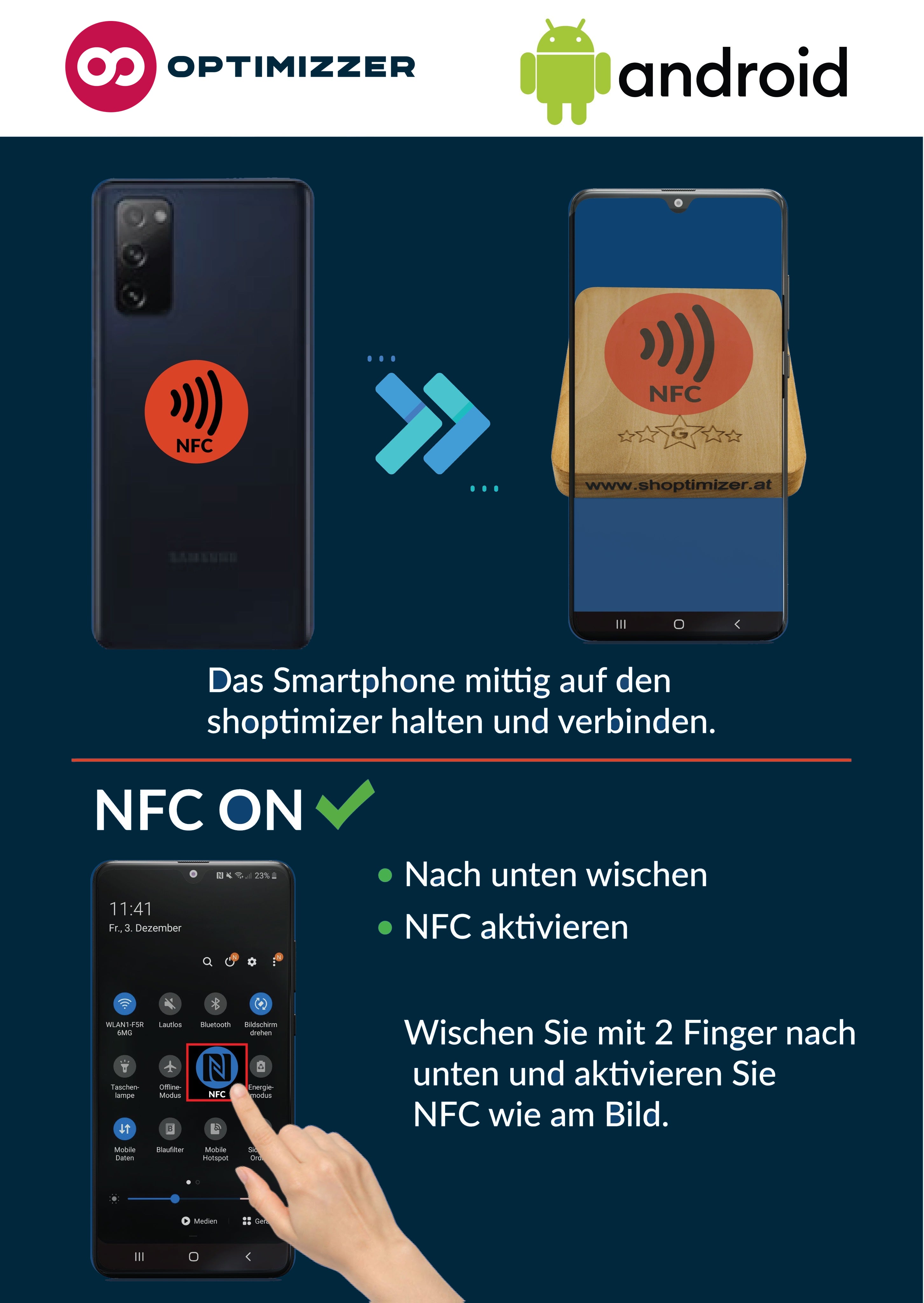
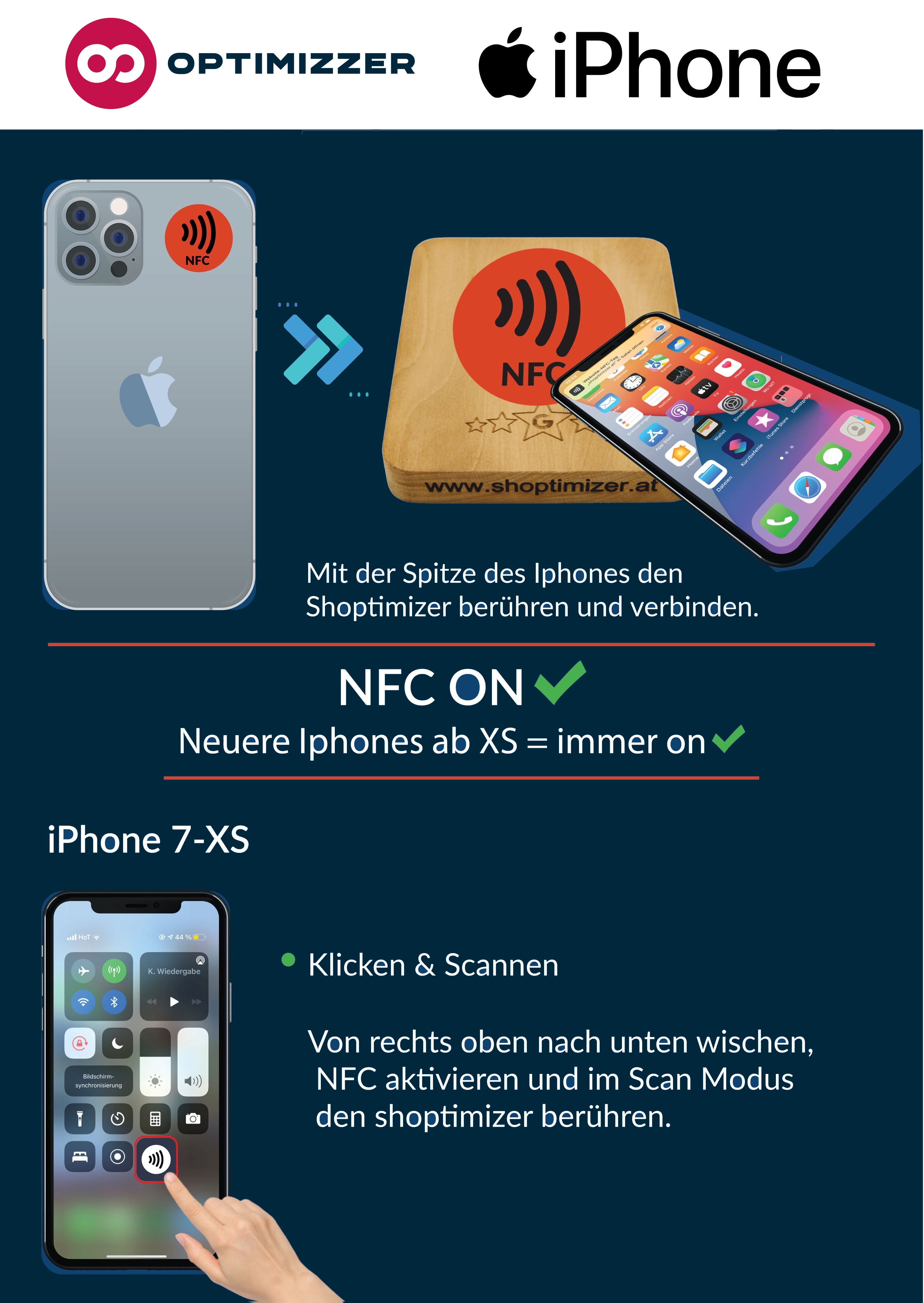
The shoptimizer uses NFC to forward to the desired platform. This means that NFC must also be activated on the scanning smartphone.
On the iPhone, NFC is in the tip at the top and on Android devices, it is in the middle of the smartphone.
How to activate NFC can be found in the respective instructions (Android or iOS) below.


How do I use the rating tool with an Android smartphone?
On most cell phones that have Android installed as the operating system, the NFC reader is located in the middle on the back of the smartphone. It is therefore important that the customer also moves his mobile phone in the direction of the Shoptimizer.
With some cell phones, the NFC reader is not automatically activated and must be activated by clicking in the settings. You can find out more about this in our instruction videos above.

How do I use the rating tool with an Apple iPhone?
With all newer iPhones from Xs, the NFC connection is permanently switched on and does not have to be activated separately. On iPhones, the NFC reader is located in the upper area of the smartphone, so it is important to tilt the iPhone slightly forward and move it towards the Shoptimizer. A link opens up for the user at the top of the screen, which must be clicked to enable forwarding to your channel.
The iPhone 6-8 models are an exception, here the reader has to be activated very briefly in the settings in order to be able to establish a smooth connection. You can find out more about this in our instruction videos above.
What do customers need to scan the QR code?
Your customers only need a smartphone with a camera.
The QR code is simply scanned with the camera - a link then automatically appears, leading directly to the review page.
To leave a review, your customers need their own account on the respective portal, such as a Google account for Google reviews.
Do my customers need a Google account?
For your customers to be able to review you on Google, they need a Google account. Most users of Android devices, YouTube, Gmail, or Google Maps already have one. Many iPhone users also have a Google account – a prerequisite that should be met for most of your customers.
How do I sign in to Google?
Most customers have their password saved for Google. A simple click on the password entry field is enough to automatically insert the password and log in.
For security reasons, authorization via fingerprint or facial recognition may be required.
Are the reviews authentic?
Real customers share their honest experiences with your company directly on site – it hardly gets more credible or authentic than that.
How long is the delivery time?
We custom-make each product just for you – therefore, the delivery time is 14 business days.
More about our evaluation tool
Digital assistant for better reputation & more sales.
Our innovative review tool enables small and medium-sized businesses to strengthen their online presence and attract more potential customers.
Material: Austrian wood
Variants: Light / Dark
Customizations: Company logo & Lettering

Do you have any further questions?
Our support team is available around the clock.
Our first-class customer service provides you with answers in the shortest possible time without long waiting periods – whether it's a question about daily use or strategic advice on how to use our products more successfully.